
How to Accept Payments on Website A Modern Merchant's Guide
Before you can start taking money on your website, you need two fundamental pieces: a merchant account to hold the funds and a payment gateway to securely handle the transaction. The good news is that modern payment service providers (PSPs) like Stripe or PayPal bundle all of this together, giving you a straightforward way to connect your site to the global payment network.
Your Blueprint for Accepting Website Payments
Diving into online payments for the first time can seem like a lot, but it really comes down to a few key decisions. I like to think of it like setting up a brick-and-mortar shop. The merchant account is your cash drawer, and the payment gateway is the card terminal that talks to the bank.
Of course, the reality today is a bit more complex. Your customers expect options. They want to pay with their credit cards, sure, but they also want the one-click ease of the digital wallets they use every single day.
Understanding the Modern Payment Ecosystem
The world of payment processing is enormous and growing at a staggering pace. The total value of global digital payments is expected to reach around $157 trillion by 2025. This isn't just a big number; it's a signal that choosing a reliable and scalable payment provider isn't just a good idea—it's essential to stay in the game.
To capture the widest audience, your system needs to handle more than just Visa and Mastercard. You have to consider things like account-to-account (A2A) transfers and Buy Now, Pay Later (BNPL) services that are quickly becoming standard. If you want to grasp the sheer scale of this industry, you can find some great insights about the payment processing industry.
Your goal is to find a solution that not only works on the back end for you but also feels completely seamless and trustworthy to the person on the other side of the screen.
Key Takeaway: Think of your payment setup as a core part of your customer experience. A smooth, secure, and familiar checkout directly builds trust and, ultimately, drives sales.
The Core Components You Will Need
Before you start comparing different companies and their pricing, it's helpful to understand the machinery behind the scenes. A complete payment solution really comes down to three parts:
- Merchant Account: This is a specific type of bank account where funds from card sales are held before being transferred to your main business account.
- Payment Gateway: This is the secure technology that grabs the payment details from your website, encrypts them, and sends them off for authorization.
- Payment Processor: This is the company doing the heavy lifting, communicating between your gateway, the card networks (like Visa or Mastercard), and your customer's bank to make the transaction happen.
Thankfully, most of the big names out there now offer all-in-one solutions that combine these components, which simplifies things immensely. This guide will walk you through making the right choice, starting with what your customers actually want to use.
Choosing Payment Methods Customers Actually Use
Figuring out which payment options to offer is more than a simple box-ticking exercise. It's about knowing your customer and making sure they feel comfortable and confident the moment they decide to buy. The goal isn't to list every payment method under the sun; it's to build a smart, curated mix that removes any friction at the finish line.
The starting point is obvious but essential: credit and debit cards. For years, they've been the foundation of online shopping. People know them, they trust them, and for many businesses, they are non-negotiable.
But the world of payments is moving fast. Today's shoppers, especially younger demographics, crave speed and simplicity. This is where digital wallets have completely changed the game.
The Rise of Digital Wallets and One-Click Payments
Think about it. Options like Apple Pay, Google Pay, and PayPal have become checkout essentials for a reason. They solve the single biggest annoyance of online shopping: fumbling around to type in card numbers and shipping details. If someone is on their phone, paying with a quick fingerprint or face scan is a world away from pecking at a tiny form.
This isn't a minor trend—it's the new standard. Digital payments now make up a staggering 66% of eCommerce transaction value worldwide, a massive leap from just 34% ten years ago. Digging deeper, digital wallets were responsible for 49% of global eCommerce transactions in 2023, and they're projected to hit 54% by 2026. If you want to stay current, you can see more about the global shift in payment industry statistics on gr4vy.com.
Building the right payment stack means thinking globally but acting locally. The differences are stark:
- In North America, traditional credit and debit cards still hold a 53% share, but digital wallets are closing the gap quickly at 30%.
- Over in Asia-Pacific, it’s a totally different picture. Digital wallets are king, with a massive 70% transaction share thanks to giants like Alipay and WeChat Pay.
- The Middle East & Africa has a more blended market, with card payments at 47% alongside a strong presence for both digital wallets and even cash-on-delivery.
The takeaway is simple: A one-size-fits-all payment strategy doesn't work anymore. You have to tailor your checkout to the real-world habits of your target customers.
Before we dive into audience specifics, let's break down the main contenders. This table gives a quick overview of what you're dealing with when comparing the most common options.
Comparing Popular Payment Methods for Your Website
| Payment Method | Typical Fees | Customer Convenience | Best For |
|---|---|---|---|
| Credit & Debit Cards | 1.5% - 3.5% + fixed fee | High (Universally accepted) | Virtually all online businesses, from small shops to large enterprises. |
| Digital Wallets | Varies (often similar to card fees) | Very High (One-click, no manual entry) | Mobile-first businesses, subscription services, and retailers focused on conversion. |
| Bank Transfers / ACH | Low (Often a small flat fee) | Medium (Requires login to bank portal) | B2B transactions, high-value orders, and services where low fees are critical. |
| Buy Now, Pay Later | 4% - 7% | High (Splits cost, increases AOV) | Retailers selling higher-priced goods like electronics, fashion, and furniture. |
| Cryptocurrency | ~1% or less | Medium (Requires a crypto wallet) | Businesses with a tech-savvy audience, international sales, or those selling digital goods. |
This table is a great starting point, but the real magic happens when you connect these methods to your specific audience.
Aligning Payments with Your Audience
Let's make this practical. Say you're running an online store selling trendy clothes to Gen Z. You’d absolutely need to accept cards, but you’d be leaving money on the table if you didn't prioritize Apple Pay and offer Buy Now, Pay Later (BNPL) options like Klarna or Afterpay. BNPL is a huge draw for younger shoppers, as it lowers the barrier for bigger purchases by splitting the cost.
Now, flip the script. Imagine you’re selling B2B software to a global clientele. Your payment needs are completely different. On top of cards and wallets, you'd need to support crucial regional methods like iDEAL in the Netherlands or SEPA Direct Debit for your European customers. Ignoring these makes you look unprepared and can instantly kill a sale.
Ultimately, you need to treat your payment options as a core feature of your product. For a closer look at the nuts and bolts of these options, our guide on digital payment solutions for businesses is a great resource. When you offer the right tools, you're doing more than just taking money—you’re showing customers you understand them. That’s how you build trust and turn a first-time visitor into a repeat buyer.
Finding Your Ideal Payment Integration Path
Okay, you've figured out what payment methods you want to offer. Now comes the big technical question: how do you actually plug them into your website? This choice is all about balancing your team's technical chops, your business goals, and how much control you absolutely need over the checkout experience.
I like to think of it like this: are you looking for a fully furnished apartment, a custom-built dream home, or a high-quality modular unit? Each integration path has its own mix of simplicity, customization, and security headaches. Let's walk through the three main routes to see which one makes the most sense for you.
Hosted Checkout: The Plug-and-Play Route
If you want to get up and running fast with the least amount of security stress, a hosted checkout page is your best friend. In this scenario, when a customer is ready to pay, they're whisked away to a secure page hosted by your payment provider—think Stripe Checkout or PayPal—to finish the transaction.
Essentially, you're outsourcing the riskiest part of the process. The provider handles the collection and processing of sensitive payment data on their own turf.
Here’s why so many businesses start with this model:
- Top-Notch Security: This is the biggest win. Since the payment provider is handling the data, your PCI DSS compliance burden shrinks dramatically. They’re the ones worrying about the complex security protocols.
- Simple Setup: You don’t need to be a coding wizard. Implementation usually involves dropping a snippet of code or a button onto your site that triggers the redirect.
- Built-in Trust: Customers know and trust names like PayPal and Stripe. Seeing a familiar, secure payment page can boost their confidence and reduce cart abandonment.
The trade-off? You give up a lot of control over the look and feel. The checkout page won't perfectly match your branding, but for speed and peace of mind, it’s a fantastic starting point.
This choice is also influenced by who you're selling to. Different customers expect different options, which can steer your integration decision.
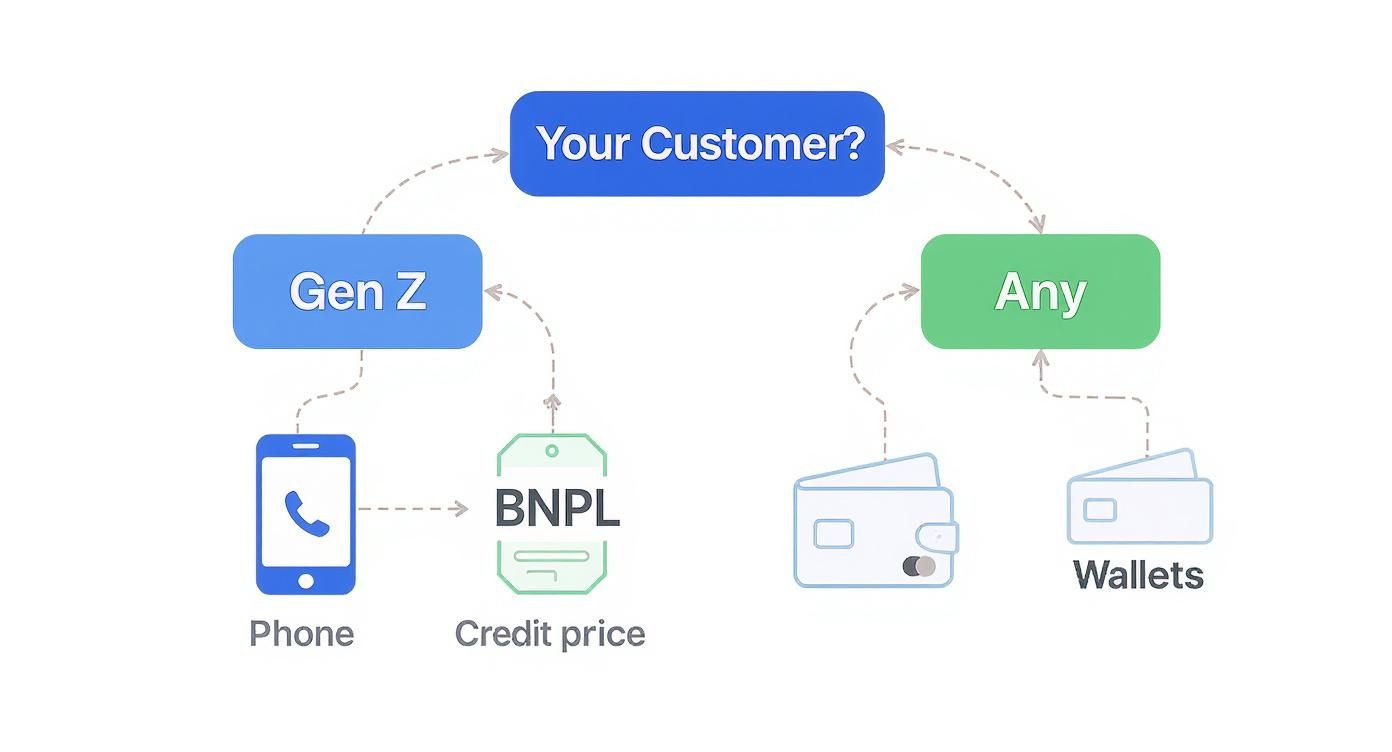
As you can see, younger shoppers are all about modern options like Buy Now, Pay Later, while digital wallets have broad appeal. If offering these is a priority, you need an integration path that supports them easily.
Direct API Integration: The Custom-Built Experience
On the other end of the spectrum, if total control and a seamless brand experience are non-negotiable, a direct API integration is the only way to fly. This path is for businesses with developers on hand who want to build a checkout flow that never forces a customer to leave their site.
Using an API (Application Programming Interface), your website's backend talks directly to the payment gateway. You design and build the entire user interface, collect payment details on your own forms, and then securely pass that data along for processing.
A Word from Experience: An API gives you ultimate design freedom, which can absolutely lift conversion rates by eliminating friction. But with great power comes great responsibility. You are now handling sensitive cardholder data directly, which makes PCI compliance a much heavier lift.
This approach is perfect for established businesses with unique requirements, like a complex subscription model or a multi-step checkout. You can obsess over every field, button, and error message to perfect the user experience. To get a real sense of the technical nitty-gritty, diving into the details of an eCommerce payment gateway integration can be an eye-opener.
Ecommerce Platform Plugins: The Best of Both Worlds
So, what if you want more control than a hosted page but don't have a dev team ready to build a custom API integration? This is where eCommerce platform plugins come in and save the day.
If your store is built on a major platform like Shopify, WooCommerce, BigCommerce, or Magento, you can leverage a huge ecosystem of pre-built extensions. These plugins are the perfect middle ground.
Here are the key advantages:
- Effortless Installation: It’s often as simple as finding the plugin in your platform’s marketplace, clicking "install," and pasting in your API keys from the payment provider.
- Integrated Experience: Most plugins keep the customer on your site through the whole checkout, offering a much more branded and professional feel than a full redirect.
- Feature-Rich: They often come loaded with goodies like subscription management, easy refund processing from your admin dashboard, and support for a whole suite of payment methods.
For the vast majority of online stores, a well-chosen plugin hits the sweet spot—it delivers the ideal blend of user-friendliness, solid security, and a great customer experience. It's no wonder this is the most popular way to get payments up and running.
Mastering Payment Security and Fraud Prevention
Let’s be honest: nothing kills customer confidence faster than a security breach. Protecting financial data isn't just a technical requirement—it's the bedrock of your relationship with your customers. A single slip-up can do irreparable damage to your brand.
The great news is that you don't have to build Fort Knox from scratch. Modern payment processors handle a ton of the heavy lifting, packing their platforms with sophisticated tools to catch fraud before it hits your bottom line.
Still, you need to understand what’s happening under the hood to make smart decisions and keep your checkout process bulletproof.
Demystifying PCI DSS Compliance
If you've been in ecommerce for more than a day, you’ve probably come across the acronym PCI DSS (Payment Card Industry Data Security Standard). Think of it as the official rulebook for anyone who touches credit card information.
How much of that rulebook applies to you? That all comes down to your integration method.
If you’re using a hosted checkout page, your provider manages the lion's share of compliance because the sensitive card data never even passes through your system. But if you go with a direct API integration where card details hit your servers, get ready—your responsibilities (and potential liability) just went way up.
Crucial Insight: The single best thing you can do to simplify PCI compliance is to ensure raw cardholder data never touches your servers. This is precisely why technologies like tokenization exist—they swap sensitive data for a secure, non-sensitive token.
One of the most powerful tools in your arsenal is payment tokenization. To really get a handle on how it works, check out our deep dive on what is payment tokenization. It’s a game-changer for modern security.
Your First Line of Defense: Fraud Prevention Tools
Beyond the baseline compliance rules, your payment gateway gives you a set of practical, real-time tools to fight fraud on the front lines. These are the workhorses protecting your revenue with every transaction.
- AVS (Address Verification System): This is a simple but effective check. It compares the billing address the customer entered with what the card-issuing bank has on file. A mismatch is a classic red flag.
- CVV (Card Verification Value): By asking for that three- or four-digit code on the back of the card, you’re getting a pretty good confirmation that the customer actually has the physical card in their hand.
- AI-Powered Monitoring: This is where things get really smart. Modern gateways use machine learning to analyze countless data points—location, device, purchase history, transaction size—to assign a risk score and automatically block the most obvious fraudulent attempts.
With the U.S. ecommerce market alone projected to hit a transaction value of $3.10 trillion in 2025, the stakes are incredibly high. Robust fraud prevention isn’t a luxury; it’s essential for survival.
Remember, payment security doesn't exist in a vacuum. It’s critical to wrap your entire site in a strong security blanket. You can learn more about these essential website security best practices. Combining broad site security with these specialized payment tools creates layers of defense that protect you, your business, and the customers who trust you.
Designing a Checkout That Converts

You can build the most secure, technically impressive payment system on the planet, but if the final checkout process is a headache, it's all for nothing. That last step is where user experience isn't just a bonus—it's the critical moment that decides between a sale and a lost customer.
This is where you have to switch hats. Stop thinking like a developer and start thinking like a shopper. Every extra field, every confusing prompt, every unexpected redirect is another reason for them to click away. Let's focus on the practical tweaks that turn a clunky checkout into a smooth, conversion-driving experience.
Eliminate Friction at Every Turn
The golden rule here is simple: make it easy. The single most damaging mistake I see businesses make is forcing customers to create an account before they can pay. It’s a huge turn-off. In fact, it's been shown to deter up to 23% of shoppers, who will ditch their cart rather than go through the hassle.
Always, always offer a guest checkout option. Make it the most prominent choice. You can ask them to create an account on the "Thank You" page after the sale is complete.
Next, take a hard look at your forms. Be ruthless. Only ask for what you absolutely need to process the payment and fulfill the order.
- Is a phone number essential, or just nice to have?
- Do you need separate billing and shipping forms when most people use the same address?
- Can you auto-fill the city and state from a zip code?
Every field you remove is a win for the user and a step closer to a successful transaction.
Build Trust and Reassurance Instantly
When someone is about to enter their credit card details, they’re in a vulnerable state of mind. Your job is to make them feel completely safe. This is where small visual cues can have an outsized impact.
Key Insight: Your checkout page isn't just a form; it's a final sales pitch for your brand's trustworthiness. Displaying familiar security logos and payment options acts as a powerful social proof that you are a legitimate and secure business.
Make sure you display trust badges—like your SSL certificate (McAfee, Norton, etc.)—and the logos of the payment methods you accept (Visa, Mastercard, PayPal, Apple Pay). These are universally recognized symbols of security that instantly lower purchase anxiety. It’s a simple visual trick, but it’s incredibly effective.
If you want to dive deeper into refining your payment flow, there are many great conversion rate optimization strategies you can explore.
Design for the Mobile-First Reality
More than half of all web traffic comes from phones, yet so many checkouts feel like they were designed for a 24-inch monitor. A form that’s a pain to use on a small screen is a guaranteed conversion killer.
Mobile optimization is more than just a responsive layout; it’s about rethinking the entire interaction.
- Use Large Form Fields: Input fields and buttons should be big enough to tap easily without having to zoom in.
- Activate the Right Keyboard: Little things make a big difference. Use
input type="email"to bring up the keyboard with the "@" symbol, andinput type="tel"to bring up the numeric keypad for phone numbers. - Break It Down: Instead of one long, intimidating page, split the process into logical chunks. An accordion-style or multi-step checkout (e.g., Shipping > Payment > Review) with a progress bar feels much more manageable.
Think about the physical act of typing on a phone. Keep it minimal. If your customer can get through the entire checkout with just their thumbs and zero frustration, you've nailed it.
Testing Your Payment System Before You Launch
You’ve built your checkout, picked your payment methods, and locked down security. It feels like you're at the finish line, but what comes next is arguably the most critical step. Skipping a thorough testing phase is like launching a brand-new ship without checking for leaks—you're just asking for trouble when your first real customers climb aboard.
Don't worry, you don't have to use real money to do this. Every decent payment provider gives you access to a sandbox or test environment. Think of it as a perfect replica of the live payment system where you can run endless fake transactions. It's your personal playground to make sure everything works exactly as it should, without a single dollar changing hands.
Simulating Success and Failure
The first thing you’ll want to do in the sandbox is confirm the "happy path." Use the test credit card numbers your provider gives you and run a few standard purchases. Does the transaction go through without a hitch? Does your site immediately show a confirmation page? And, just as important, does the order pop up correctly in your back-end system?
Once you know a successful payment works, it's time to try and break things. A truly solid payment setup isn't just about processing successful orders; it’s about handling failures gracefully. Your payment provider will have a list of special test card numbers designed to trigger specific errors.
You absolutely need to test these common failure scenarios:
- A card with insufficient funds.
- An expired card or an incorrect CVC.
- A card number flagged as lost or stolen.
- A transaction declined by the bank for suspected fraud.
Pay close attention to what the customer sees when these errors occur. A vague "transaction failed" message is a conversion killer. It leaves customers confused and frustrated. A much better approach is a clear, helpful message like, "Your card was declined. Please double-check your details or try a different payment method." This guides them toward a solution instead of sending them to a competitor's site.
My Two Cents: Get organized and document everything. I always use a simple spreadsheet to track my test cases—what I tested, the expected result, and the actual result. It feels like extra work at the time, but this little checklist has saved me from major headaches more times than I can count.
The Final Go-Live Checklist
After you’ve put your sandbox through its paces and you're confident everything is running smoothly, it's time to flip the switch. Moving from the test environment to the real world isn't just a single click; it requires one last, careful review.
Before you announce your site is open for business, run through this final checklist:
- Swap Your API Keys: This is the #1 mistake I see people make. You have to replace the test/sandbox API keys with your live production keys. If you forget this, no real payments will ever go through.
- Double-Check Your Fee Structure: Hop into your payment provider's dashboard and make sure the transaction fees are what you expect. It's better to catch a surprise here than on your first payout report.
- Confirm Payout Details: Is your business bank account information correct? A single typo here could delay you from getting your money.
- Process a Real Micro-Transaction: The final, definitive test. Use your own credit card to buy something for $1.00. Watch the transaction go all the way through, and then immediately process a refund. This one small act confirms that the entire chain—from your website, through the gateway, to your bank account—is working perfectly.
Taking the time to be meticulous here isn't about being paranoid; it's about making sure your first real customer has a flawless experience. That peace of mind is worth every second you spend testing.
A Few Lingering Questions
As you get closer to launch, you'll probably have a few nagging questions. It's totally normal. Here are the answers to some of the most common things that come up when you're setting up online payments.
Payment Gateway vs. Payment Processor: What's the Real Difference?
It’s easy to get these two confused, but the distinction is pretty simple when you break it down.
Think of the payment processor as the heavy lifter. It's the financial engine in the background that actually communicates with the banks and moves the money from your customer’s account to yours.
The payment gateway is more like the secure messenger. It’s the piece of tech that lives on your site, grabs the sensitive card details, encrypts them, and safely passes them over to the processor to get the "yes" or "no" on the transaction.
Nowadays, a lot of the big names like Stripe or PayPal bundle both of these functions into a single, neat package, which makes life a whole lot easier for you.
So, How Much Is This Going to Cost Me?
This is the big one, right? The costs can vary, but almost every provider will charge you on a per-transaction basis. The industry standard you'll see everywhere is something like 2.9% + $0.30 for each sale.
But that's not always the whole story. You need to keep an eye out for other potential charges:
- Monthly fees: Some providers charge a flat fee just to keep your account open.
- Setup fees: A one-time charge to get you started.
- Chargeback fees: If a customer disputes a charge and wins, you’ll get hit with a penalty fee.
Generally, hosted checkouts or e-commerce plugins have very transparent, all-in-one pricing. If you go with a more traditional merchant account and a direct API, you might negotiate lower rates if you have high sales volume, but the fee structure can get a lot more complicated. My advice? Always read the fine print.
A quick tip from my own experience: Don't get fixated on just the percentage. Add up all the potential fees to figure out what each transaction truly costs. It’s the only way to know how it’ll really affect your profit margins.
How Long Until I Actually Get My Money?
Nothing is more important to your cash flow. How quickly the money hits your bank account depends entirely on your provider's "settlement time" or "payout schedule."
Many of the newer platforms have rolling payouts, meaning the funds land in your bank account within 2-3 business days. Others, like PayPal, might put the money into a digital wallet first, and you have to manually transfer it out. Some of the more old-school merchant accounts can take even longer.
This isn't a minor detail—it's critical for managing your business day-to-day. Make sure you know the payout timing before you commit.
Ready to open your doors to the world of crypto? BlockBee gives you a secure, non-custodial way to accept over 70 different digital currencies. With low fees and instant payouts, it's a simple way to expand your payment options. Start accepting crypto payments today.
Review Us